
When finance teams review IT purchases, the focus is usually on one number: the price on the quote. But the purchase price is only part of what a laptop costs your business. Set-up, support, repairs, downtime and disposal all add up over the life of the device.
For CFOs, financial controllers and IT directors in the Philippines, getting the CapEx vs OpEx decision right, and planning a sensible refresh cycle, makes a real difference to the IT budget.
CapEx vs OpEx: what's the difference?
- Capital expenditure (CapEx): buying equipment outright. The laptop becomes a company asset on the balance sheet, and its cost is spread over its useful life through depreciation.
- Operating expenditure (OpEx): paying for equipment or services as an ongoing cost, such as subscriptions, rental or managed services. These are generally treated as regular business expenses.
Accounting treatment depends on the arrangement. Under current lease accounting rules (IFRS 16, adopted in the Philippines as PFRS 16), some leases still appear on the balance sheet, so check with your accountant before you choose a model.
Which suits your business?
- CapEx tends to suit businesses with available cash, a stable headcount and a preference for owning their equipment.
- OpEx tends to suit businesses that are growing quickly, want predictable monthly costs or need equipment for short-term projects.
Depreciation of computer equipment
When you buy laptops as CapEx, the depreciation of computer equipment spreads the cost across the years you use it. Many companies use the straight-line method, where the same amount is expensed each year.
As a simple example, a laptop bought for PHP 60,000 and depreciated over three years with no residual value would be expensed at PHP 20,000 a year. The useful life you use should follow your company's accounting policy and your accountant's advice.
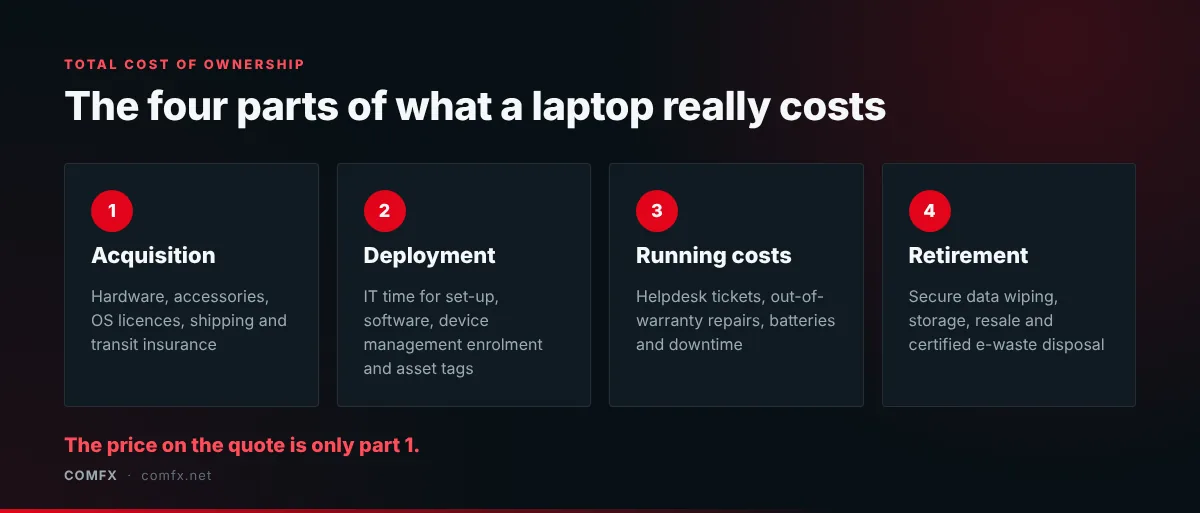
The four parts of total cost of ownership
- Acquisition: the hardware, accessories, operating system licences, shipping and transit insurance.
- Deployment: IT staff time spent setting up devices, installing software, enrolling them in device management and tagging assets.
- Running costs: helpdesk tickets, out-of-warranty repairs, battery replacements and the cost of employee downtime when a device fails.
- Retirement: secure data wiping to a recognised standard such as NIST SP 800-88, storage, resale and certified e-waste disposal.
Laptop lifespan: how long do laptops last?
A well-built business laptop can keep running for five years or more. The question is whether it's still worth running. Once the manufacturer warranty ends, every repair comes out of your budget, batteries start to fade and older processors struggle with current software.
That's why many organisations plan around a three to four year laptop lifespan, lining up refreshes with the length of the warranty. Replacing devices on a predictable cycle keeps staff productive, keeps every active machine under warranty and means devices still have some resale or trade-in value when they're retired.
When you plan the next refresh, compare the main business laptop families and see why retail-bought laptops often cost more over the same cycle.